Complete Player Guide
Systems Guide
On Roc Mountain, progression, trading, luck, and transparency come together in one place. All systems below open from inside the game; opening a direct browser link does not create a session. Your token is tied to your character — always open the panel from the game.
Overview
| System | What it does | Currency / points |
|---|---|---|
| Daily Login | Daily calendar + rewards | Silk, Gold (make-up days) |
| Drop Log | Live drop tracking | — |
| Stall (Market) | Player trading + wallet | Silk, TL, Gold |
| Special Mall | Flash Sale + daily luck | Silk |
| Achievements | Quests + market | Market Points, Silk, Gold… |
| Spin Fortune | Wheel of fortune | Silk → tickets |
1) Daily Login — Attendance Event

What is it?
A monthly login calendar. Each day you open the panel and mark your day; keep the streak unbroken to claim rewards into your chest. Missed days can be made up with Silk or Gold.
How to open
Open the Daily Login panel from the game. Your character is recognized automatically. At the top you see Silk, Gold, Marked days, and Missing days.
Reading the calendar
- Empty — not marked yet
- Checked in — you logged in that day
- Make-up — filled in for a fee
- Ready — reward can be claimed
- Today — the current day
You see 28–31 boxes depending on the month. The calendar refreshes on a schedule.
Step-by-step
- Open the panel from the game.
- Today may be marked automatically; if not, click the Today cell.
- If past days are empty, select those first.
- Use Silk or Gold for Make up selected days, or Fill the rest of the month.
- Read cost and rewards in the confirmation window → Confirm.
- On days with a complete streak, use Claim Reward on the right panel.
- Rewards go to your chest.
Important rules
- To claim a reward you must be marked continuously from day 1 through that day. A gap in the middle locks that day’s reward.
- Today cannot be made up — only past empty days.
- While missing days exist, today is not marked: “Make up missing days first; then today will be marked.”
- There is a daily character limit per HWID / IP / PC. When the limit is reached, another character cannot use daily login.
- After make-up confirmation, balance is deducted; the transaction cannot be reversed.
- Each reward is claimed once; no repeat claims.
Player tips
- Close gaps first → mark today → claim rewards in order.
- “Fill the rest of the month” can be expensive mid-month; estimate with selected days first.
- Make-up prices depend on server settings (Silk / Gold table).
- If you get a limit warning, don’t try another character on the same PC — it resets tomorrow.
2) Drop Log — Live Drop Tracking

What is it?
A log of important items on the server whitelist. See who dropped what, from which mob, in which region, and when — transparently. It is not a reward panel; it is for information and tracking.
How to open
Open the Drop Log panel from the game.
On screen
- Latest Drops — showcase of the last 3 drops
- Summary strip: Total, 24h, Player, Item
- Main table: Character · Item · Mob · Region · Time
- Search: character name
- Filter: Only my drops
- Pagination (~40 records)
- List auto-refreshes (~8 sec)
Step-by-step
- Open the panel → live feed loads.
- Track rare / important drops from Latest Drops.
- Search for a player or yourself.
- Hover item / mob for detail tooltips; mobs may show map / spawn info.
Rules
- Only whitelisted items are logged. Not every drop appears.
- No claim / reward — log only.
- Session must come from the game.
Tips
- Turn on your filter to verify your farm route.
- Read competitor farm / rare drop activity from the 24h summary.
- No entry means no whitelisted drop at that moment; the panel may look empty.
3) Stall (Market) — Player Economy

What is it?
Player-to-player item and gold market plus Real TL wallet. Prices are in Silk or TL. VIP listings can broadcast to the server.
How to open
Open the Stall panel from the game.
Tabs
| Tab | Function |
|---|---|
| Inventory | Select items, list for sale |
| Market | Browse listings, buy |
| Gold | Sell or buy gold packages with Silk/TL |
| My Sales | Manage active listings |
| Wallet | Real TL, Silk, game credit; withdraw / transfer / gift code |
Selling items
- Go to Inventory (synced with in-game bag).
- Select the item to sell.
- Choose price type: Silk or TL (minimum is usually 1).
- Optionally mark VIP listing (default extra fee: 10 Silk).
- List for sale.
- When sold, commission is taken; net amount goes to your account.
Buying items
- Search / filter in Market (All · Silk · TL).
- Open listing → buy.
- Item goes to inventory.
- You cannot buy your own listing.
Gold market
Sell or buy gold with preset packages (e.g. 500M, 1B, 2B, 3B, 4B, 5B, 10B). Payment is Silk or TL.
Wallet
- View Real TL balance
- Transfer TL to in-game credit
- Redeem gift code
- TL withdrawal: IBAN + full name + bank
- Default minimum: 50 TL · processing fee: 10% · payout usually within 1–24 hours
- You are responsible for IBAN errors (TR + 24 digits / 26 characters)
Fees (defaults)
- Silk sale commission: 5%
- TL sale commission: 5%
- VIP listing: 10 Silk
- VIP announcement template:
[Character] listed a VIP stall offer: Item — Price - Automatic VIP repeat: about every 120 minutes
Job mode block
While in Job (trade profession) mode, item and gold trading is disabled. You see “You are in Job Mode” on screen. Leave Job → refresh / wait on the panel → trade.
Other rules
- Only whitelist items can be sold.
- Each listing is priced in either Silk or TL, not both.
- Inventory / market lists refresh periodically.
Tips
- Before selling, use the fee box to calculate net proceeds.
- Use VIP for faster sales; cost is 10 Silk.
- After Job farming, leave Job before opening Stall.
- Double-check IBAN when withdrawing TL.
4) Roc Mountain Special Mall — Flash Sale

What is it?
A flash shop that opens in a limited daily time window. Unlike the classic mall: time-limited, discounts personalized with Daily Luck, payment in Silk.
How to open
Open the Special Mall / Flash Sale panel from the game.
Flash window (default)
- Friday / Saturday / Sunday · 21:00 – 00:00
- On screen: window countdown + Open / Closed status
- When closed, purchases and luck spins do not work
Daily Luck
Wheel to refresh discounts: Free · 25 Silk · 50 Silk · 100 Silk. Up to 4 spins per day. Each spin usually applies roughly 1–20% discount to product × package combinations.
Purchasing
- Window must be Open.
- Select a product.
- Choose package quantity: 10, 20, …, 100.
- Confirm discounted Silk price.
- Silk is deducted → item goes to chest.
Important rules
- Same product (ItemID) can be bought once per day (quantity does not matter).
- Insufficient Silk blocks the transaction.
- Confirmation text: Silk is deducted, item is added to chest.
Example product categories (catalog varies by server): Magic Pop, Premium Magic Pop, Special Reverse, Resurrection, Global Chat, Immortal / Astral, Great Enhancer, Flowers Set, Damage / Absorb buffs, etc.
Tips
- Use the free luck spin as soon as the window opens.
- Check the “best package” suggestion in the tooltip.
- Only one purchase per product per day — don’t click the wrong item.
- Track popular products from global purchase history.
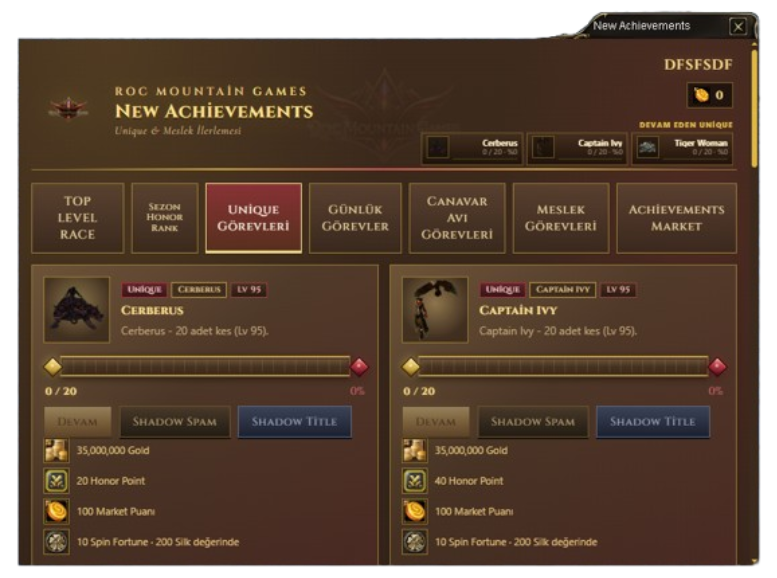
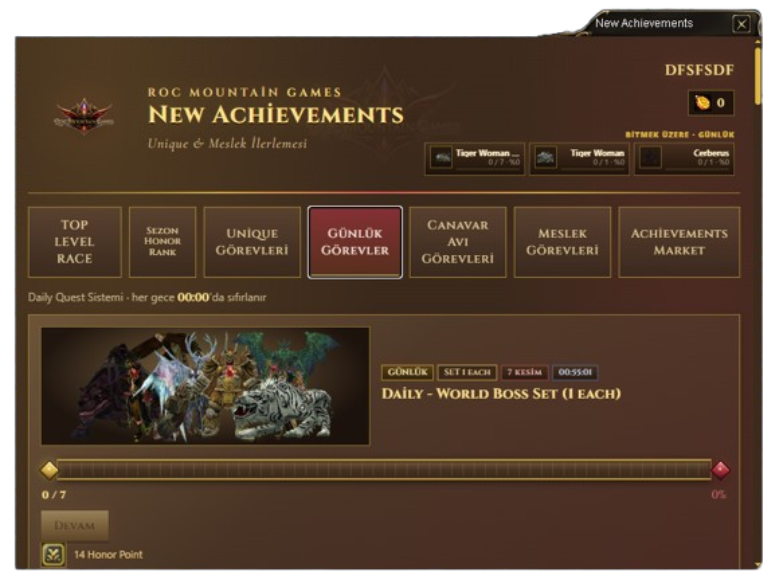
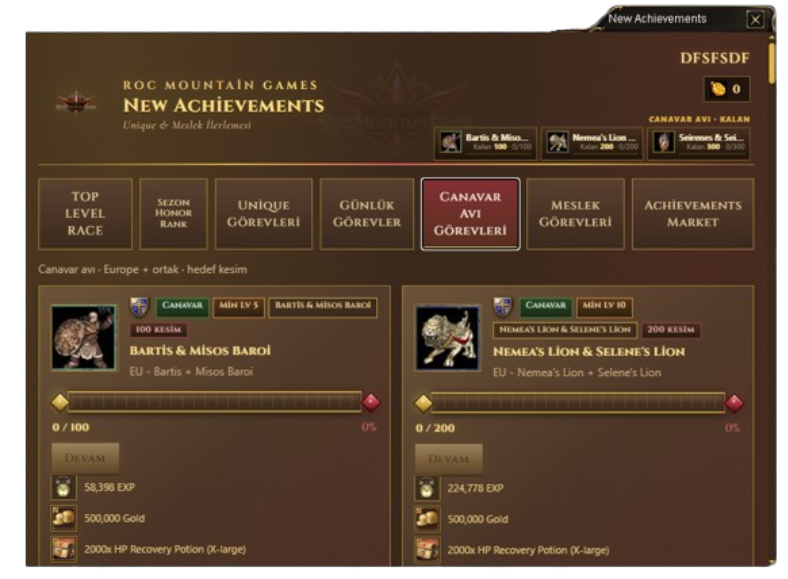
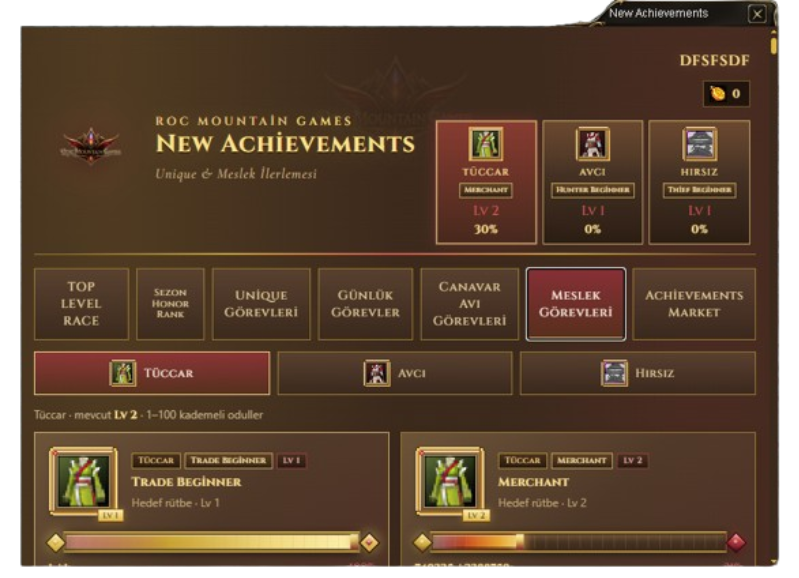
5) Roc Achievements — New Achievements
What is it?
Quests, rewards, and a Market Points shop focused on Unique & Job progression. Content you play (unique, mob, job, daily) turns into progress and rewards.
How to open
Open the Achievements panel from the game (slightly wider window than other panels).
Tabs
- Unique Quests — Unique kill targets
- Daily Quests — Reset every day (00:00); countdown shown
- Monster Hunt Quests — Mob kill counters; some require level
- Job Quests — Trader / Hunter / Thief level targets
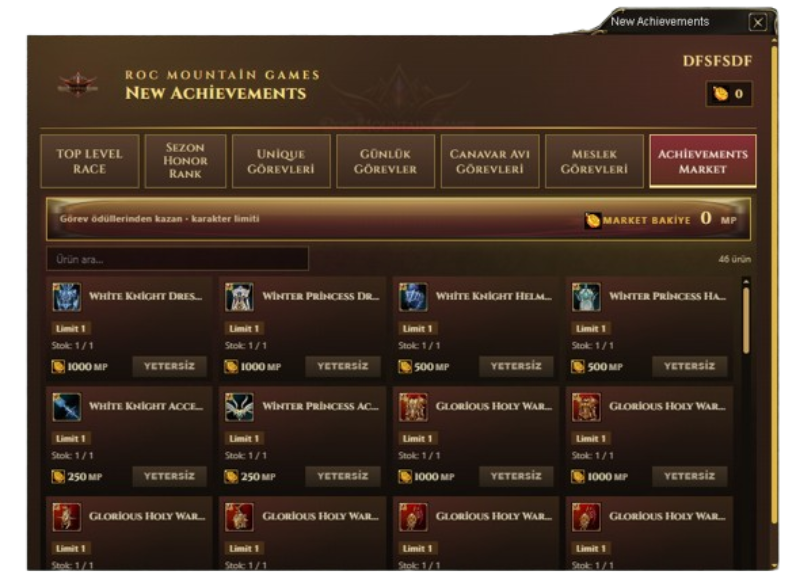
- Achievements Market — Shop with Market Points
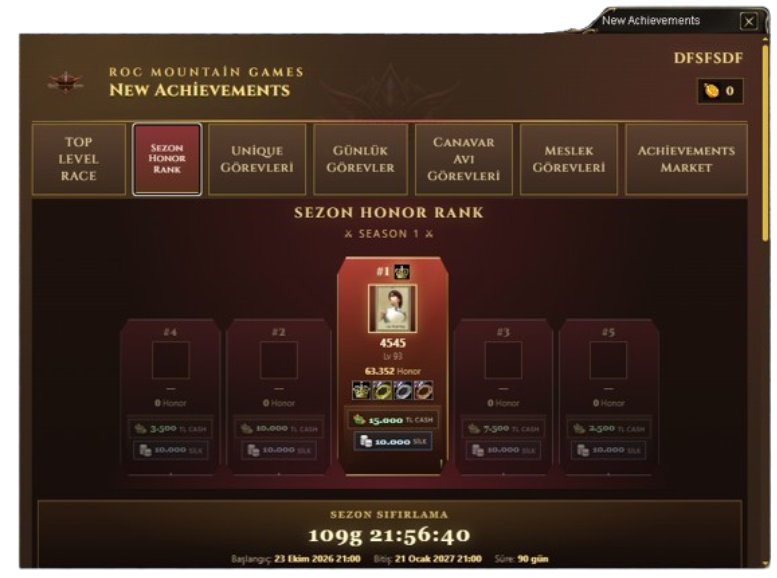
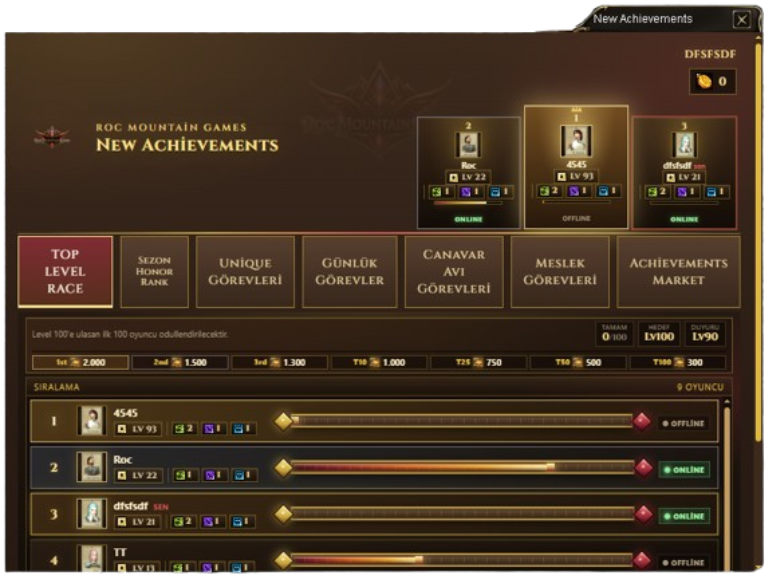
- (If enabled) TOP LEVEL RACE, Season Honor Rank
Reward types
Item (chest) · Silk · Gold · Zerk · Honor Point · Market Points · Char EXP · Job EXP · Spin Fortune ticket
Step-by-step
- Open the quest on the relevant tab.
- Complete the goal in-game (kill unique, kill mobs, level job…).
- When progress is full, Claim Reward becomes active on the card.
- Claim → goes to chest / account.
- Save Market Points → buy from Achievements Market.
Unique side
The catalog includes targets such as Tiger Girl, Uruchi, Isyutaru, Lord Yarkan, Demon Shaitan, Cerberus, Captain Ivy, Merikh, Khulood, Karkadann, Roc, and similar. Some quests may have extra Shadow / title flows. Target counts and rewards vary by server settings.
Daily example
E.g. Caravan 15 Rounds → Honor reward; resets at midnight. To claim again the same day, the quest must be repeatable.
Market (example pricing logic)
- Avatar sets cost high points (e.g. 250–1000), usually limit 1 per character
- Consumables / reverse-style items lower points, higher quantity limits
- Premium items like God’s Blessing cost high points
- Insufficient points or limit reached blocks purchase
Rules
- No claim before the quest is finished.
- Most rewards are one-time.
- Level-locked quests cannot progress below required Lv.
- Race / double-click on claim may return “already claimed” — refresh the panel.
Tips
- Finish Daily Quests first each day.
- Job EXP updates live on the Job tab.
- Don’t burn Market Points on avatars too early; save for season goals.
- Combine Unique farming with Achievements targets on the same route.
6) Spin Fortune — Wheel of Fortune

What is it?
A luck event where you buy spin tickets with Silk and spin the wheel. Rewards go to your character / chest; big wins may trigger a server announcement.
How to open
Open the Spin Fortune panel from the game.
Screen
- Spins (tickets) and Silk balance
- Career: Total … spins
- Reward pool
- Live wins — recent wins
- Buy Spin — purchase tickets
- Spin / Auto / Stop — spin controls
- Leaderboard: Top 3 (total spins)
Step-by-step
- Check per-ticket price (Silk; free periods may exist).
- Buy tickets with Buy (presets: 1, 5, 10, 20, 50, 100, 250).
- Maximum 250 tickets per purchase.
- Spin manually; use Auto to continue, Stop to halt.
- Up to 100 multi-spins per request.
- Rewards go to inventory / chest.
- Watch Live wins and Top 3.
Rules & warnings
- No tickets — buy first; the system may ask to “buy missing tickets and spin.”
- Insufficient Silk blocks purchase.
- If session drops, re-enter the game and open the panel again.
- Reward pool and rates depend on server settings (GM admin panel).
Tips
- Try small packs first; don’t leave Auto unattended.
- From Live wins, see which rewards drop often.
- If Achievements gave Spin rewards, check tickets before spinning.
- Big win announcements appear on the server — don’t miss the timing.
All panels must be opened from inside the game. A direct browser link does not create a session.